Automox and Reporting Your Environment
Automox has reporting available for you to view and download. Included are our activity log Record of device/policy activity and worklet execution results., data extracts, needs attention report, overview report, policy results report, and pre-patch report.
From the Reports page, select View for the type of report you want to view.
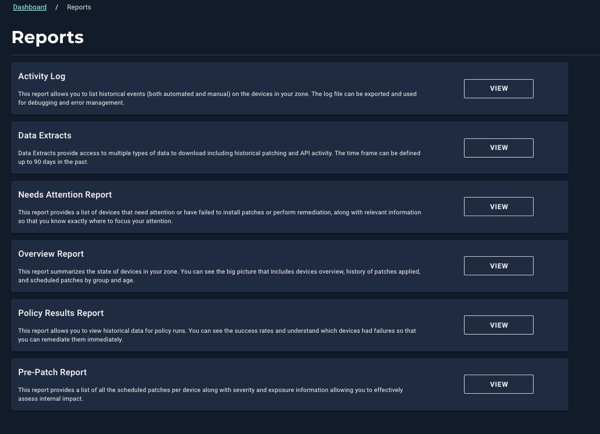
Available Reports
Each report provides a different perspective on your organization A subset of an account. An Automox customer account can be tied to multiple organizations, and users can be invited to, and access multiple organizations. An organization contains users, devices, and policies.’s patching activity, device status The current state of the device: Connected, Disconnected, Pending Restart, Failed Update, etc., or system actions. You can view reports directly in the console or download them for further analysis.
Activity Log
Lists historical events, including automated and manual actions performed on devices A subset of Assets, a general term denoting anything that runs the Automox Agent and is registered with the system. in your organization. You can export this log for review or troubleshooting purposes. For device-specific logs captured from recent scans, see Device Logs on the Device Details page.
Data Extracts
The Data Extracts report provides two export options:
- Patch History: Provides detailed patch A software security or stability update. and policy execution When a policy runs on targeted devices per schedule. data for all devices in your organization. Use this export to analyze patch history, policy results, or overall remediation activity within a selected time range.
- API activity: Captures historical API usage across your organization, including API requests, methods, response codes, and timestamps. Use this export to audit API activity and monitor integration performance over time.
Needs Attention Report
Identifies devices that require attention, such as those with failed patches or pending remediations. This report highlights where issues occurred so you can act quickly.
Overview Report
Summarizes the overall state of devices in your organization. It includes historical patch data, device group information, and scheduled policy details for a broad operational view.
Policy Results Report
Displays historical results for policy runs. Use this report to see which devices completed successfully, which failed, and when each policy executed.
Pre-Patch Report
Lists all upcoming scheduled patches per device. It includes severity and exposure details to help you assess potential impact before deployment.
