Understanding Global Access Management
Global access management allows an Account Administrator Account-level role managing billing, users, and organizations or a (Global) Full Administrator of a company's IT infrastructure to manage all organizations A subset of an account. An Automox customer account can be tied to multiple organizations, and users can be invited to, and access multiple organizations. An organization contains users, devices, and policies. and users Represents a set of login credentials and contact information for an external user. A user is associated with an account. Once created a user should get privileges granted to act:
- at an account level
- at an organization level from a centralized Global View Centralized interface for managing multiple organizations under a single account..
Account-level role managing billing, users, and organizations or a (Global) Full Administrator of a company's IT infrastructure to manage all organizations A subset of an account. An Automox customer account can be tied to multiple organizations, and users can be invited to, and access multiple organizations. An organization contains users, devices, and policies. and users Represents a set of login credentials and contact information for an external user. A user is associated with an account. Once created a user should get privileges granted to act:
- at an account level
- at an organization level from a centralized Global View Centralized interface for managing multiple organizations under a single account..
Account administrators have the following permissions:
- Manage all aspects of an account
- View all users for all organizations
- Create and manage organizations
- Add, modify, and remove users
- Create custom roles at the Account level and assign or remove users from roles
Full administrators at the global level have the following permissions:
- View all users for all organizations
- View and manage all organizations
- Add, modify, and remove users
- Create custom roles at the Global level and assign or remove users from roles
To access the Setup & Configuration page, click the Global View button where organizations are listed. Select Manage Orgs and Users from the menu.
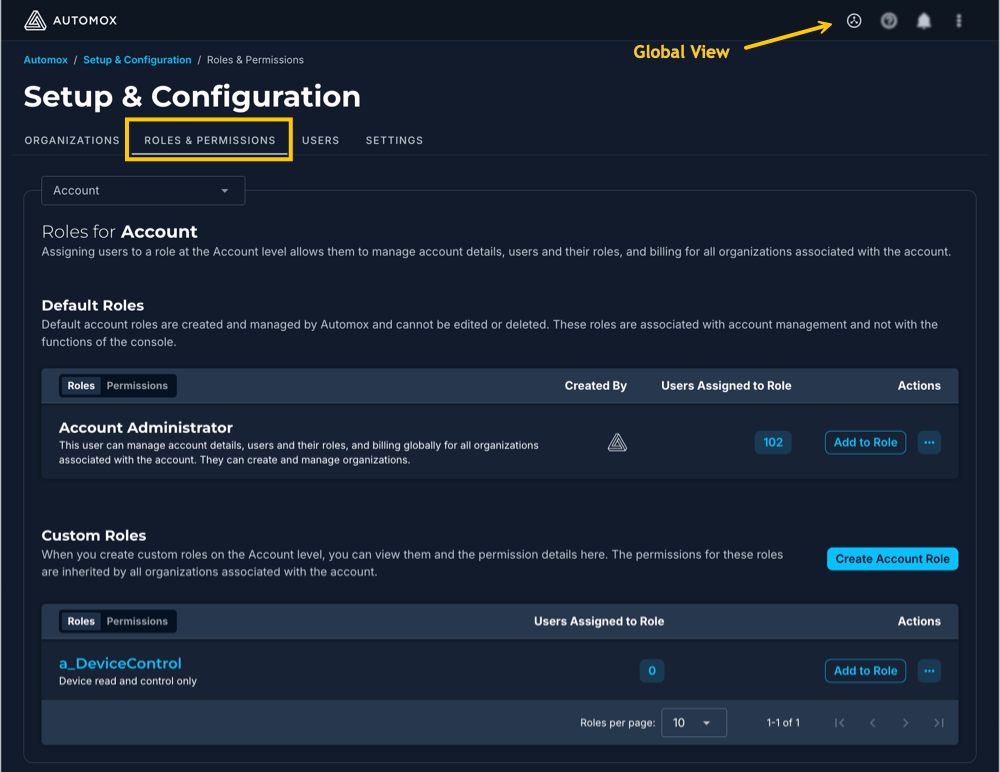
For more information about these roles, refer to Understanding Roles and Permissions.
