Managing Policies
You can create patch A software security or stability update., software, and custom configuration policies (Worklets Represents an automation script that can execute on a set of devices, consisting of evaluation and remediation code blocks. Worklets can be OS-specific or targeting a platform-agnostic language.) that are enforced regardless of geographic location. From the main console Our web-based management dashboard, available at https://console.automox.com., click Automate to access these settings.
Viewing Policies
You can view a list of all policies in your organization A subset of an account. An Automox customer account can be tied to multiple organizations, and users can be invited to, and access multiple organizations. An organization contains users, devices, and policies. from the Automate → Policies page.
- Use the Search Policies field to search for a specific policy.
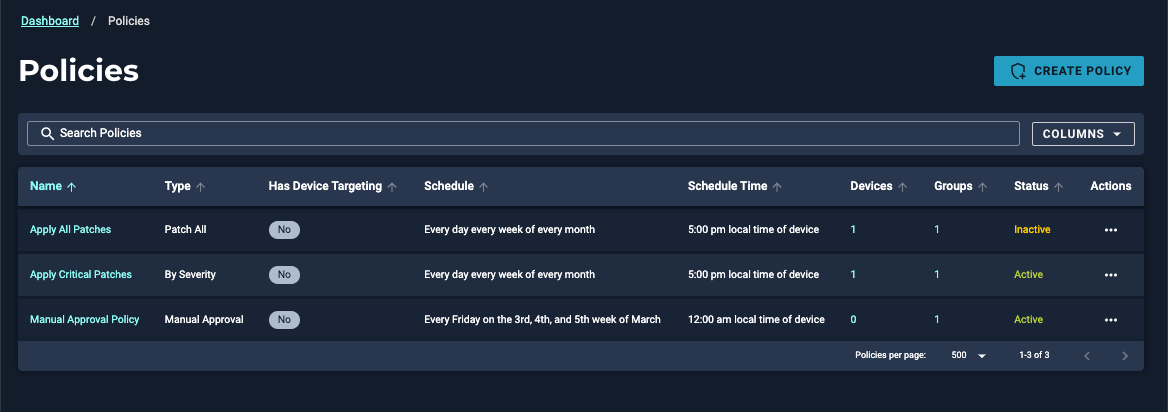
Creating a Policy
You can create new patch policies Policy type automating OS and third-party patching, or a Canopy configuration that defines which devices get which macOS update, and when. from the Policies page.
- Click Create Policy to create different types of policies.
- On the Create Policy page, click the type of policy you want to create. The types of policies are described in the following section.
Policy Types
Here are the types of policies you can create. Click the headings for detailed descriptions.
Creating a Patch Policy
These policies patch some or all of the software that Automox natively supports.
- Patch All Policy template that patches all available updates across all OSes.
- Patch Only
- Patch All Except
- Manual Approval
- By Severity
- Advanced Policy
Creating a Required Software Policy
You can install and patch software packages that do not have native support from Automox.
Creating a Worklet
Worklets can perform any scriptable action on devices, including disabling a vulnerable process, managing native OS controls, mass rollback of patches, removing unwanted applications, and many other system configurations.
Setting a Patching Schedule
When you create a policy or worklet, you must set a schedule. Refer to Setting a Patching Schedule for details about start times and ensuring the schedule is configured for your needs.
User Notifications
You can configure user notifications to alert end users about upcoming updates or required restarts on Windows and macOS devices. These notifications appear in the Automox Tray and include a visible deadline for when action must be taken.
For details about configuring user notifications and managing the Automox Tray experience, see End-User Notifications.
Complete any other options according to the policy or worklet you are creating or editing and select Create Policy or Save Policy.
Related Topics
- Creating a Patch Policy
- Filtering and Searching on the Polices Page
- See the Community discussions around worklets
