What are macOS Background Updates?
You can view or modify software update settings for macOS.
Default settings on macOS enable Apple to routinely and silently push out updates to your device A subset of Assets, a general term denoting anything that runs the Automox Agent and is registered with the system.. You can view or modify this preference in the Software Update preference pane:
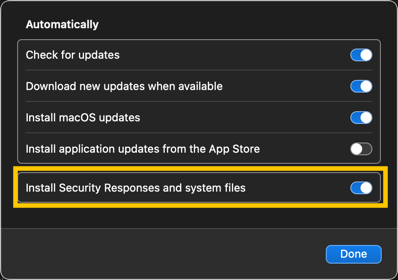
Background updates include important updates to these built-in macOS security tools:
Gatekeeper: Validation of third-party applications
Malware Removal Tool (MRT): Anti-malware
XProtect: Signature-based antivirus
In the Automox console Our web-based management dashboard, available at https://console.automox.com. Group Represents a concrete grouping of devices. Every device must be assigned to a single group. A group contains settings for the following:
- refresh interval
- OS auto-update settings, you can select Disable OS Automatic Updates under OS Patch Management. For more about Groups, see Managing Groups.

With this setting, Automox manages background updates in the console, and they appear as follows:
Gatekeeper Configuration Data
MRTConfigData
XProtectPlistConfigData
